
If reconnaissance is scouting from a distance, scanning is the first stage where we begin actively interacting with the target. If you've ever played StarCraft, this is the part where you send a worker to the enemy base early in the game to determine their build order and infer their intentions.
I use this example because this is the point at which you begin interacting with the target directly. During reconnaissance, we primarily collect information from public resources and third-party databases. During scanning, we start asking the target itself questions.
Because of this, scanning is often detectable and may generate logs, alerts, firewall events or intrusion detection activity.
Examples of questions we may be trying to answer include:
- Which hosts are online?
- Which ports are open?
- Which services are running?
- Which operating system is being used?
- Which technologies are exposed?
For example:
10.10.10.15

22/tcp   Open   SSH
80/tcp   Open   HTTP
443/tcp  Open   HTTPS
At this stage we have not yet gathered detailed information about these services. We have simply identified that they exist and may warrant further investigation.
Common Scanning Tools
The most widely used scanning tool in cybersecurity is Nmap.
Nmap can perform tasks such as:
- Host discovery
- Port scanning
- Service identification
- Operating system detection
- Basic vulnerability discovery
For example:
nmap 10.10.10.15
A larger scan may reveal:
22/tcp   Open   SSH
80/tcp   Open   HTTP
135/tcp  Open   MSRPC
445/tcp  Open   SMB
3389/tcp Open   RDP
Other commonly encountered scanning tools include:
| Tool | Purpose |
|---|---|
| Nmap | General-purpose network scanning |
| Masscan | Extremely high-speed port scanning |
| RustScan | Fast port discovery |
| Naabu | Fast port discovery |
| Nessus | Vulnerability scanning |
| OpenVAS | Vulnerability scanning |
Scanning Example
To clearly demonstrate scanning, I first completely disabled the Firewall on the Windows 10 machine from the lab and I will perform a scan from Kali.
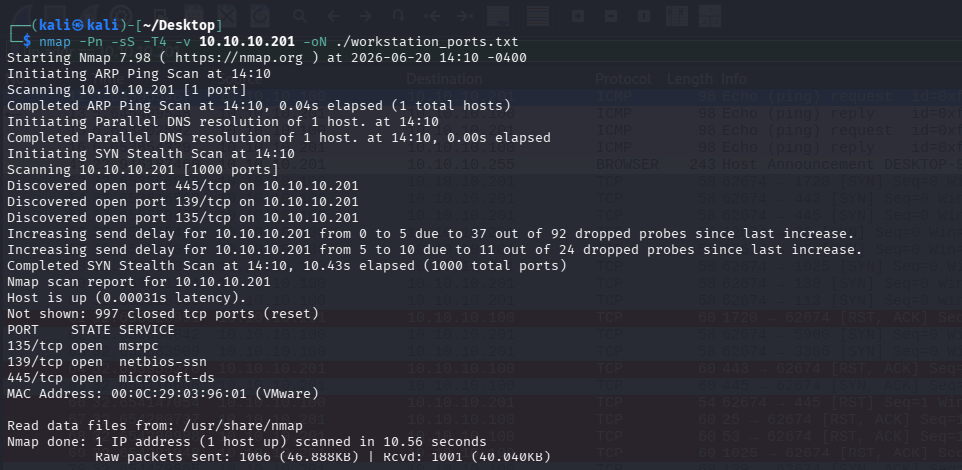
As you can see, we acquired several results, even though this is simply an out-of-the-box Windows 10 installation.
The command breakdown:
nmap -Pn -sS -T4 -v 10.10.10.201 -oN ./workstation_ports.txt

-Pn              : Treat the target as online and skip host discovery
-sS              : SYN scan by initiating, but not completing TCP handshakes
-T4              : Do it faster / more aggressive
-v               : Verbose / display output immediately, not just after exit
10.10.10.201     : The workstation IP address we set at the lab setup
-oN <filename>   : Save the results to the file "workstation_ports.txt"
However, please note that very noticeable traffic was generated:
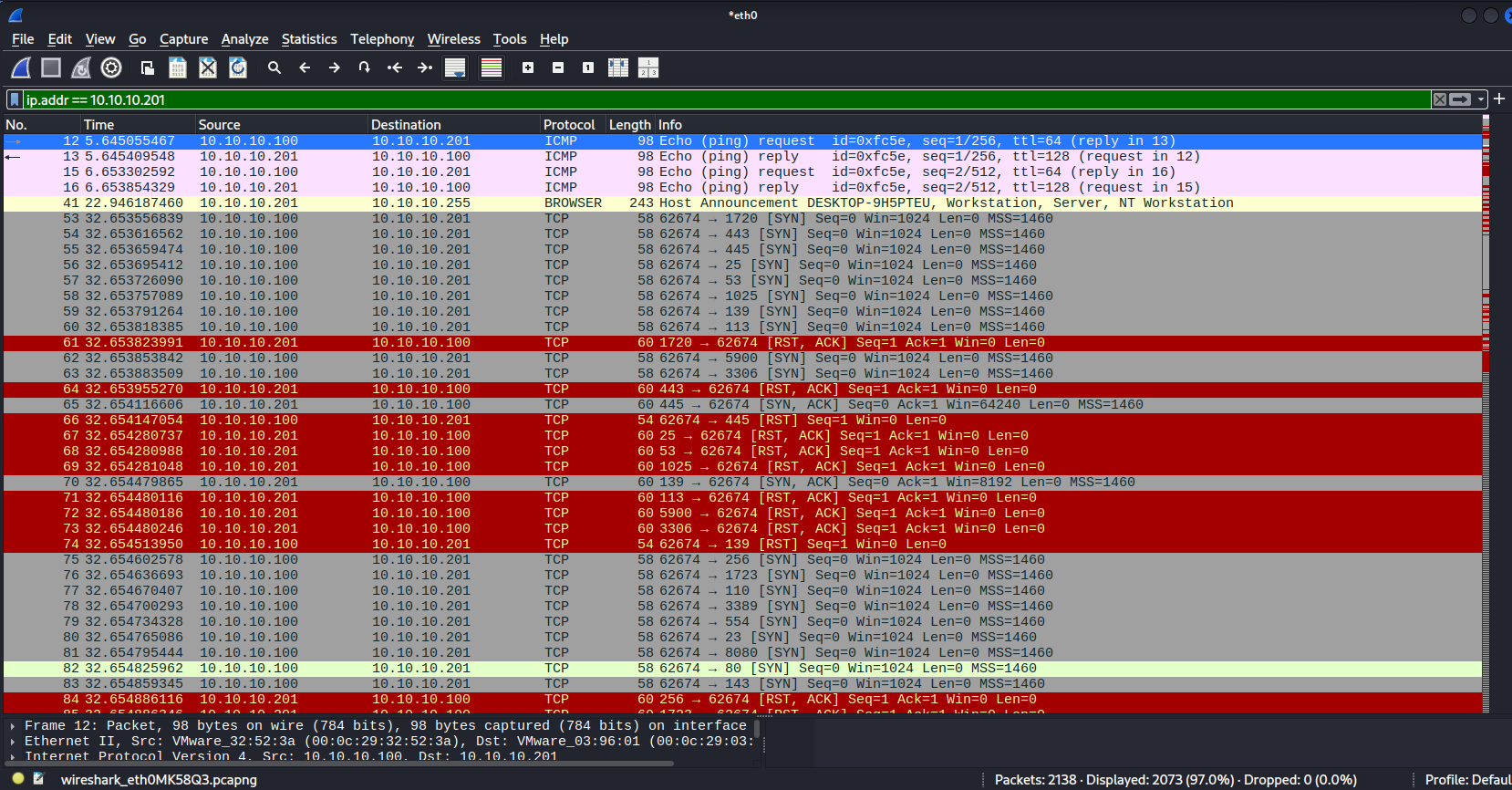
Observe how:
10.10.10.100(Kali) sends probes, sequentially to different ports10.10.10.201(Windows) responds either positively or negatively to them
Based on the responses, the scanner may infer whether the target service is:
- Up
- Down
- Possibly up but behind a firewall
For example, knowing that TCP/445 is open tells us that SMB likely exists on the target, but it does not tell us what shares are available, whether anonymous access is enabled, which users exist or what version is running. Those questions belong to the next phase: Enumeration.
OPSEC
It is important to understand that scanning is often one of the loudest activities an operator can perform. Aggressively scanning infrastructure may be perfectly acceptable during a penetration test or other authorized assessment, but real-world environments are frequently protected by logging, monitoring and detection capabilities that generate telemetry from such activity.
For this reason, scanning is often performed deliberately and within a tightly defined scope. The objective is not to collect every possible piece of information, but rather to gather enough information to make informed decisions about the next stage of the engagement.
As operators gain experience, they often rely less on broad scans and more on their understanding of how environments are typically constructed. For example, when assessing an Active Directory environment, an experienced operator may reasonably expect to encounter services such as RPC, SMB, Kerberos, LDAP, WinRM and RDP without needing to perform extensive scanning first.
This does not mean scanning becomes unimportant. Rather, it becomes more focused and purposeful, with each scan designed to answer a specific question rather than simply collecting information for its own sake.