
Before we begin discussing variables and data types, it is useful to understand how they ultimately live.
When a program is compiled (e.g. "build"), it becomes a binary—a file containing machine instructions and data that can be loaded and executed by the operating system. Although the exact format differs between operating systems (PE on Windows, ELF on Linux, Mach-O on macOS), most binaries share the same high-level concepts.
Rather than being one giant block of data, a binary is divided into multiple sections, each serving a different purpose.
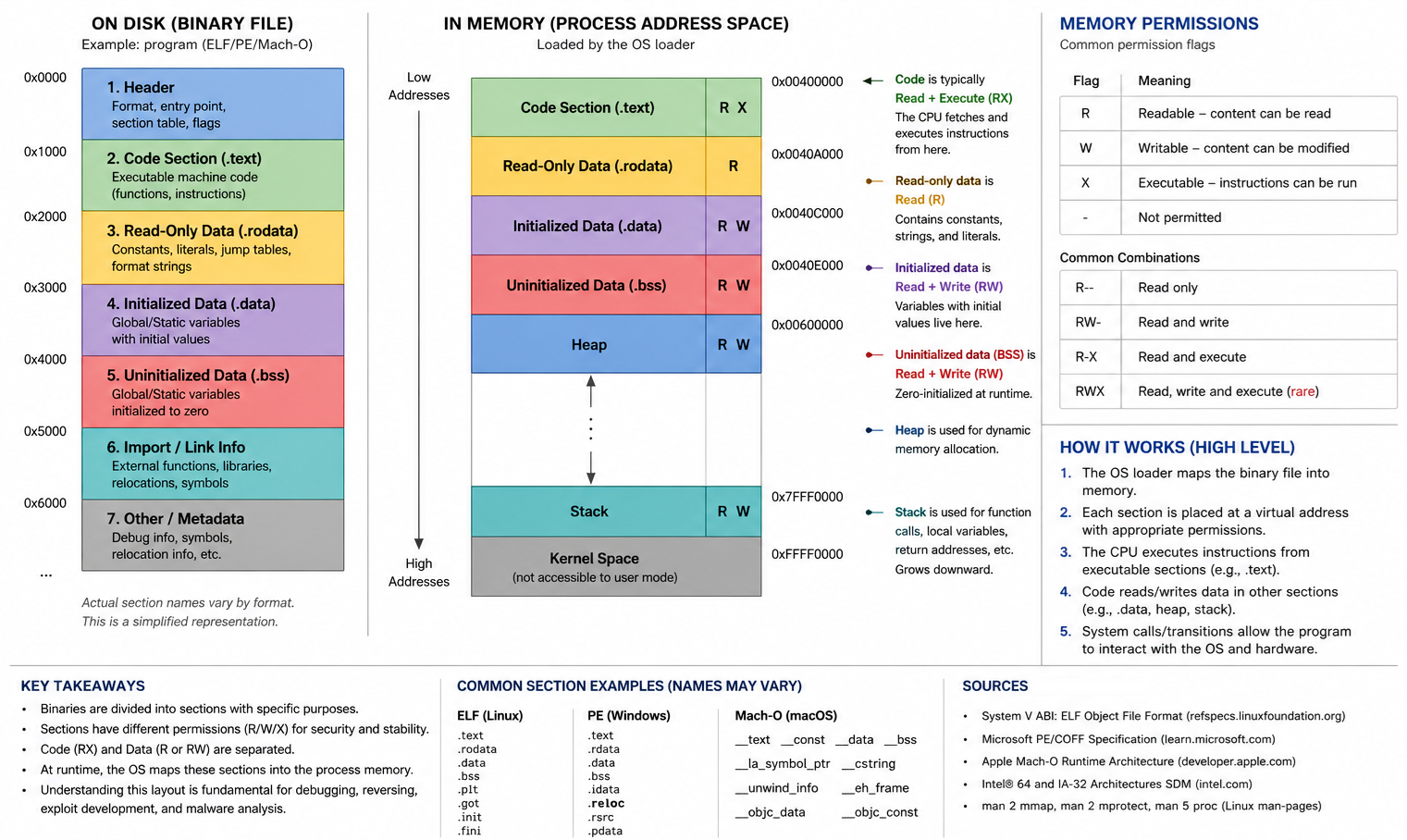
A simplified view might look like this:
| Section Type | Purpose |
|---|---|
| Code Section | Contains executable instructions that the CPU can run |
| Data Section | Stores initialized variables and program data |
| Read-Only Data Section | Stores constants and static strings |
| Import/Linking Information | Information about external libraries and functions |
| Metadata | Information used by the operating system and loader |
Different sections may have different permissions:
| Permission | Meaning |
|---|---|
| Read (R) | Data can be viewed |
| Write (W) | Data can be modified |
| Execute (X) | CPU instructions can be executed |
For example, the code section is typically Read + Execute (RX) because it contains instructions that should run but generally should not be modified. A data section may be Read + Write (RW) because the program needs to access and manipulate data during execution.
Code Section      -> RX
Data Section      -> RW
Read-Only Data    -> R
As the program executes, code from executable sections reads and modifies data stored in other sections. For example, an instruction may load a variable from a data section, perform a calculation and then store the result back into memory.
This separation of code and data is a fundamental concept that appears repeatedly throughout software development, reverse engineering, exploit development and malware analysis. Understanding it now will make later topics such as memory layouts, shellcode, memory corruption and process internals much easier to understand.
Shellcode
The binary structure is important because code frequently references data located elsewhere in the binary. A function may access a variable in a data section, read a string from a read-only section or call another function through a pointer. The entire program depends on these relationships remaining intact.
Shellcode is fundamentally different.
Instead of being a structured file with multiple sections and metadata, shellcode is typically a small block of position-independent machine instructions designed to execute directly in memory. Unlike a compiled binary, shellcode is not organized into formal sections such as .text, .data or .rdata that are understood by the operating system loader. In many ways, shellcode is often a mixture of code and data living inside a single executable memory region.
For this reason, shellcode often has to locate functions, resolve addresses and manage execution using techniques that ordinary applications never need to consider.
For now, it is sufficient to understand that most software relies heavily on a structured binary layout, whereas shellcode is designed to operate with little or no structure at all. We will revisit shellcode near the end of this chapter and explore how it works in significantly more detail.
Compiled Binary
- Separate code section
- Separate data section
- Imports
- Relocations
- Loader support
- Structured format (PE/ELF/Mach-O)
Shellcode
- Usually one executable memory region
- Code and data commonly mixed together
- No loader support
- No imports table
- No formal section layout
- Must resolve many things itself