
SSL/TLS is the technology that encrypts web traffic.
Without it:
Client -------------------> Server
          HTTP
Anyone in the middle can read everything.
With TLS:
Client ==================> Server
         Encrypted
Here is an example of the traffic generated when requesting https://google.com:
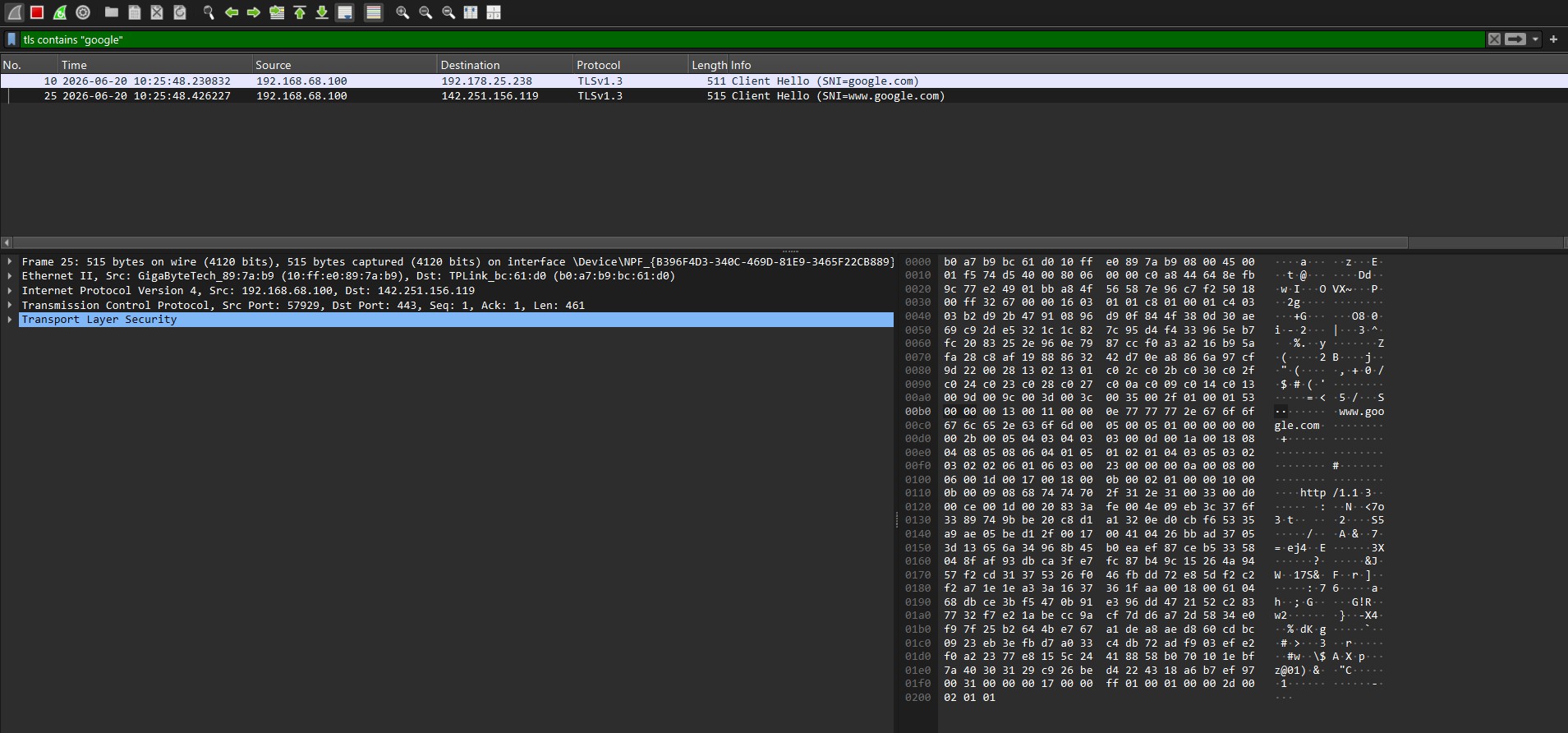
Anyone in the middle sees only ciphertext.
Encryption is the process of using mathematical algorithms and keys to transform readable data (plaintext) into an unreadable form (ciphertext), protecting the data from unauthorized access while it is stored or transmitted.
SSL vs TLS
Historically:
SSL 2.0
SSL 3.0
TLS 1.0
TLS 1.1
TLS 1.2
TLS 1.3
SSL is obsolete and insecure.
Today when people say:
SSL Certificate
SSL Inspection
SSL VPN
they almost always mean TLS.
Why TLS Exists
Without TLS:
POST /login

username=admin
password=Password123
Anybody on the network could read:
- Usernames
- Passwords
- Cookies
- API keys
- Banking data
TLS prevents this.
What TLS Actually Provides
TLS provides:
Confidentiality
Only the endpoints can read the data.
Integrity
Traffic cannot be modified unnoticed.
Authentication
The client can verify who the server is.
Certificates
When you connect to:
https://google.com
Google presents a certificate.
A certificate contains:
- Domain name
- Public key
- Issuer
- Expiration date
Example:
Subject: google.com
Issuer: DigiCert
Expires: 2027
Certificate Authorities (CA)
Why do we trust Google's certificate?
Because it is signed by a trusted Certificate Authority.
Examples:
- DigiCert
- GlobalSign
- Sectigo
- Let's Encrypt
Your operating system contains a list of trusted root CAs.
Certificate Chain
Typically:
Root CA
    ↓
Intermediate CA
    ↓
Server Certificate
Example:
DigiCert Root
    ↓
DigiCert Intermediate
    ↓
google.com
The browser verifies the entire chain.
Public and Private Keys
The server owns:
Private Key
and publishes:
Public Key
The public key is embedded inside the certificate.
Certificate
    └── Public Key
The private key never leaves the server.
TLS Handshake
Before encrypted communication starts:
Client
Server
must agree on encryption settings.
This process is called:
TLS Handshake
Simplified TLS Handshake
Client:
Hello
I support:
TLS1.2
TLS1.3
AES
CHACHA20
Server:
I choose:
TLS1.3
AES256
Server:
Here is my certificate
Client:
Certificate trusted?
Domain matches?
Not expired?
If yes:
Generate shared secrets
Communication begins.
Session Keys
The certificate key is NOT used to encrypt all traffic.
Instead:
Certificate
    ↓
Handshake
    ↓
Session Key
A temporary session key is generated.
That key encrypts the actual traffic.
Perfect Forward Secrecy
Modern TLS uses ephemeral key exchanges.
Usually:
ECDHE
This means:
Even if the server's private key is stolen later...
Past sessions remain secure.
This is called:
Perfect Forward Secrecy
TLS Versions
Avoid:
SSL 2.0
SSL 3.0
TLS 1.0
TLS 1.1
Current standards:
TLS 1.2
TLS 1.3
TLS 1.3 is preferred.
Cipher Suites
A cipher suite defines:
- Key exchange
- Authentication
- Encryption
- Integrity algorithms
Example:
TLS_AES_256_GCM_SHA384
Meaning:
AES-256
GCM Mode
SHA384
Modern TLS 1.3 simplified cipher suite selection significantly.
TLS Inspection
Some organizations decrypt TLS traffic.
Example:
Employee
    ↓
Corporate Proxy
    ↓
Internet
The proxy:
- Terminates TLS
- Reads traffic
- Creates a new TLS session
This is often called:
SSL Inspection
TLS Inspection
MITM Proxy
Tools:
- Burp Suite
- Zscaler
- Blue Coat
- Netskope
Self-Signed Certificates
A certificate can sign itself.
Example:
CN=DC-1
Issuer=DC-1
Browsers typically display:
Connection not private
because the issuer is not trusted (e.g. the little lock in the top-left corner).
Common Certificate Errors
Expired
Certificate expired
Wrong Hostname
Certificate:
google.com
Accessing:
mail.google.com
may fail if not covered.
Untrusted CA
Certificate issued by unknown authority.
Let's Encrypt
Let's Encrypt provides free trusted certificates.
Very common in modern infrastructure.
Most websites today use:
Let's Encrypt
or a commercial CA.