
HTTP is the language used by applications to communicate over the web.
When you open a website, log into a portal, submit a form, or call an API, HTTP is usually the protocol carrying the conversation.
At its core, HTTP is extremely simple:
- A client sends a request.
- A server sends a response.
Browser ------------------> Web Server
         HTTP Request

Browser <------------------ Web Server
         HTTP Response
Real Example
You type:
https://operatoronthewire.com
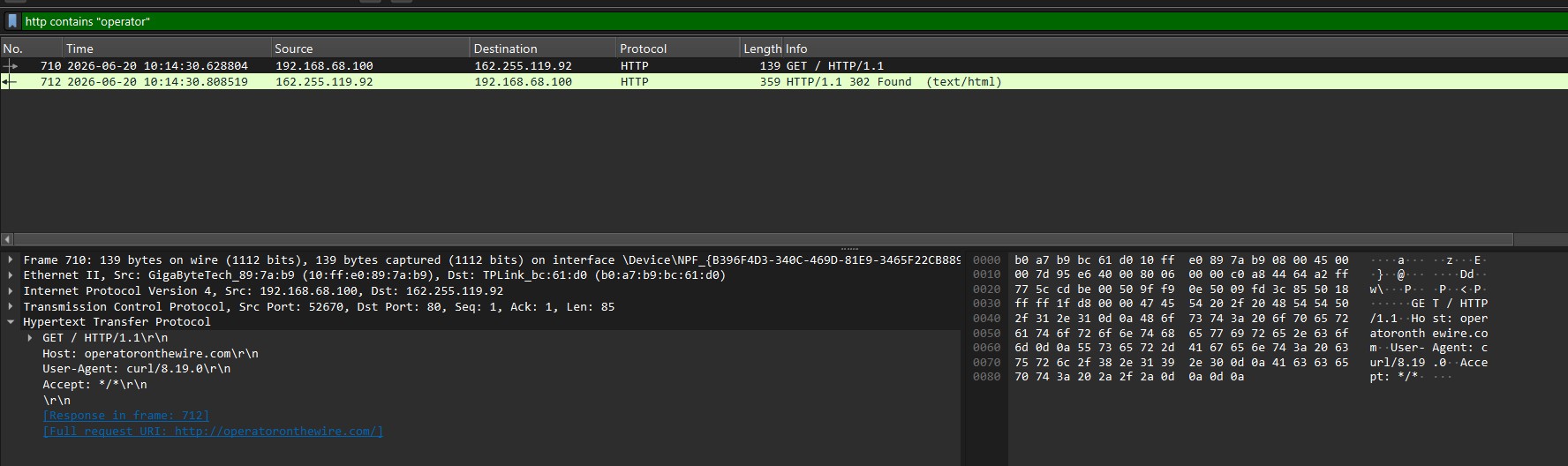
Your browser sends:
GET / HTTP/1.1
Host: operatoronthewire.com
User-Agent: Chrome
Accept: text/html
The server responds:
HTTP/1.1 200 OK
Content-Type: text/html

<html>
  <body>
    Welcome to OOTW
  </body>
</html>
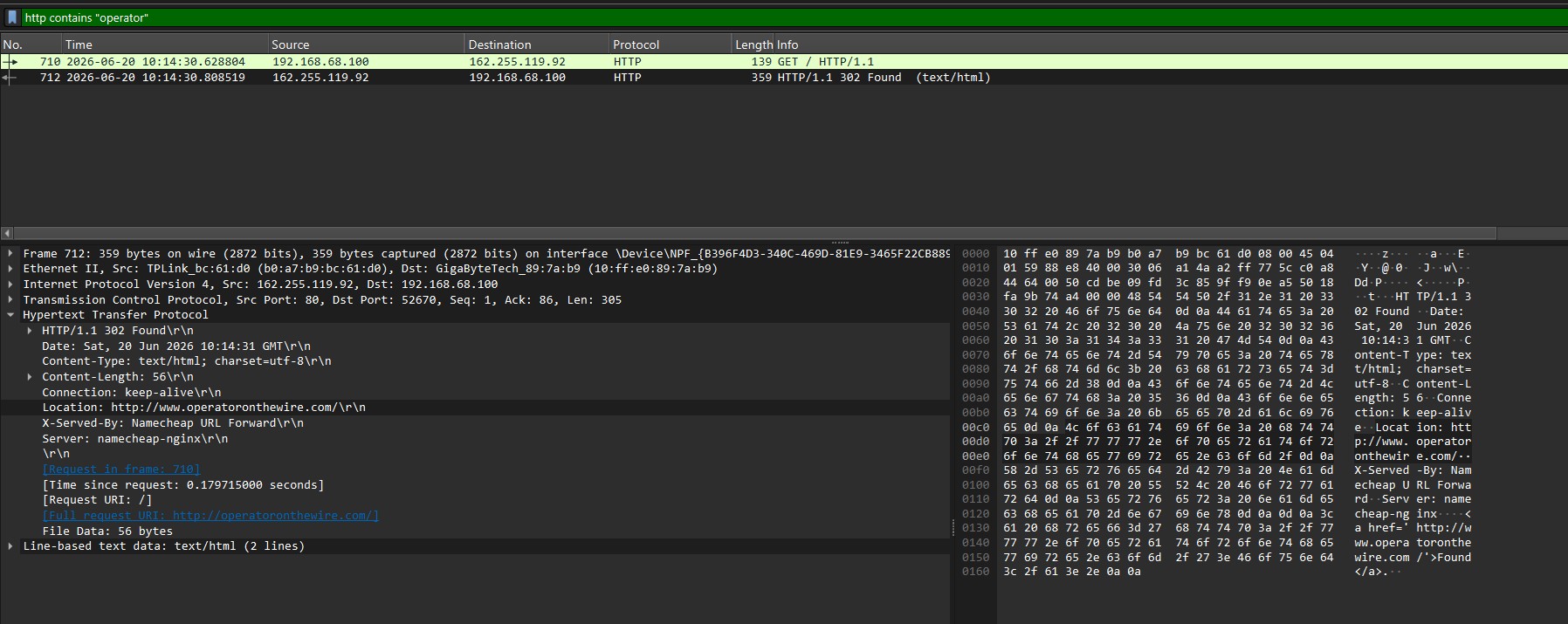
Note that the actual website is not actually deployed at the time of writing.
Request Structure
Every HTTP request consists of:
Request Line
Headers
(Optional Body)
Example:
POST /login HTTP/1.1
Host: operatoronthewire.com
Content-Type: application/x-www-form-urlencoded

username=antares&password=Password123
Request Line
The first line contains:
METHOD PATH VERSION
Example:
GET /index.html HTTP/1.1
| Part | Meaning |
|---|---|
| GET | Action |
| /index.html | Resource |
| HTTP/1.1 | Protocol Version |
HTTP Methods
Methods describe what we want to do.
GET
Retrieve data.
GET /users
Translation:
"Give me the users."
POST
Create something.
POST /users
Translation:
"Create a new user."
PUT
Replace an existing object.
PUT /users/5
Translation:
"Replace user 5 entirely."
PATCH
Modify part of an object.
PATCH /users/5
Translation:
"Change a few fields of user 5."
DELETE
Delete something.
DELETE /users/5
Translation:
"Delete user 5."
Headers
Headers are metadata.
Example:
Host: operatoronthewire.com
User-Agent: Chrome
Cookie: sessionid=12345
Authorization: Bearer abcdef
Think of headers as sticky notes attached to the request.
"Who am I?"
"Which browser am I?"
"Which session do I have?"
"How should the data be interpreted?"
Request Body
Not all requests have a body.
GET usually does not.
POST often does.
Example:
POST /login HTTP/1.1

username=admin&password=Password123
The body contains the actual data being sent.
Response Structure
Responses are very similar.
Status Line
Headers
Body
Example:
HTTP/1.1 200 OK
Content-Type: text/html

<h1>Hello</h1>
Status Codes
Status codes tell us what happened.
200 OK
Everything worked.
HTTP/1.1 200 OK
201 Created
Something was created.
HTTP/1.1 201 Created
301 / 302 Redirect
Go somewhere else.
HTTP/1.1 302 Found
Location: /login
401 Unauthorized
Authentication required.
HTTP/1.1 401 Unauthorized
403 Forbidden
Authenticated, but not allowed.
HTTP/1.1 403 Forbidden
404 Not Found
The resource does not exist.
HTTP/1.1 404 Not Found
500 Internal Server Error
Server exploded.
HTTP/1.1 500 Internal Server Error
URLs
A URL consists of several parts:
https://operatoronthewire.com:443/admin/login?id=5
| Component | Value |
|---|---|
| Scheme | https |
| Host | operatoronthewire.com |
| Port | 443 |
| Path | /admin/login |
| Query String | ?id=5 |
Query Parameters
Example:
https://site.com/users?id=5&admin=true
The server receives:
id = 5
admin = true
Many web vulnerabilities originate here.
Cookies
Cookies allow websites to remember users.
Server:
Set-Cookie: sessionid=ABC123
Browser stores it.
Future requests:
Cookie: sessionid=ABC123
This is how websites remember that you are logged in.
Authentication
Example:
Authorization: Bearer eyJhb...
Or:
Authorization: Basic YWRtaW46cGFzc3dvcmQ=
Authentication is usually carried in headers.
Content Types
The server needs to know what data is being sent.
Examples:
Content-Type: text/html
Content-Type: application/json
Content-Type: application/xml
Content-Type: multipart/form-data
JSON
Modern APIs usually speak JSON.
Request:
POST /users

{
  "username": "antares",
  "role": "admin"
}
Response:
{
  "id": 5,
  "username": "antares"
}
HTTPS
HTTP itself is plaintext.
HTTPS is:
HTTP + TLS
Browser
    |
    | Encrypted
    |
Server
Without HTTPS:
Anyone on the network can read the traffic.
With HTTPS:
Traffic is encrypted.
SSL and TLS will be explored more in depth in the next class.