
Network Topologies and Segmentation
Before we start discussing IP addresses, routing, DNS, Active Directory, or attacks, we first need to understand what a network actually looks like.
Many beginners imagine a network as a giant flat collection of computers connected together.
Real environments are never that simple.
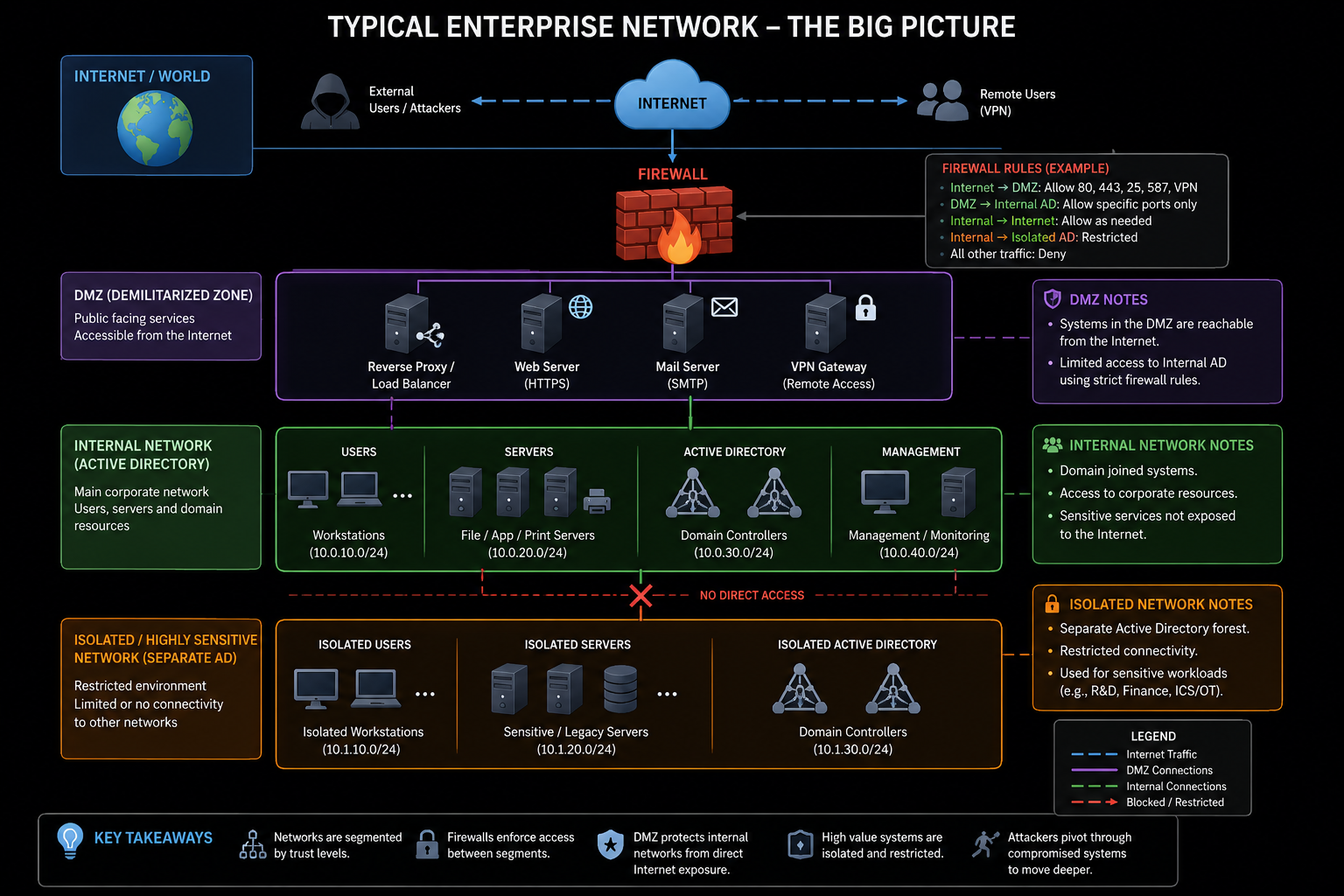
Modern networks are usually divided into multiple segments with different trust levels, access controls, and purposes.
Understanding these segments is critical because offensive operations often revolve around moving between them.
The Simplest Possible Network
A home network often looks like this:
                Internet
                    │
                    │
            +---------------+
            | Home Router   |
            +---------------+
              │     │     │
              │     │     │
           PC-1   PC-2  Laptop
All systems belong to the same network.
Example:
192.168.1.0/24
Every device can typically communicate with every other device.
This is called a:
Flat Network
Flat Networks
A flat network contains little or no segmentation.
Example:
192.168.1.0/24

PC-1
PC-2
Laptop
Printer
NAS
All devices share the same broadcast domain.
Advantages:
- Simple
- Easy to manage
Disadvantages:
- Poor security
- Easy lateral movement
- Large attack surface
For attackers:
Compromise one system
        ↓
Potentially reach everything
For defenders:
One compromise
        ↓
Entire network at risk
Enterprise Networks
Real organizations typically divide systems into separate network segments.
Example:
                     Internet
                         │
                         │
                    Firewall
                         │
        ┌────────────────┼────────────────┐
        │                │                │
        │                │                │
      DMZ           Internal LAN      Guest WiFi
Different network segments serve different purposes.
Each segment can have separate security controls.
Network Segmentation
Network segmentation means dividing systems into separate networks.
Example:
10.0.10.0/24
Workstations
10.0.20.0/24
Servers
10.0.30.0/24
Management
10.0.40.0/24
Guest Network
Communication between segments is usually controlled by firewalls.
Why Segmentation Exists
Imagine an employee laptop becomes infected.
Without segmentation:
Employee Laptop
        ↓
Domain Controller
        ↓
SQL Server
        ↓
File Server
Potentially reachable immediately.
With segmentation:
Employee Laptop
        ↓
Firewall
        ↓
Server Network
Traffic may be blocked entirely.
This dramatically slows attackers.
DMZ (Demilitarized Zone)
One of the most important concepts in enterprise networking is the DMZ.
A DMZ is a network that sits between:
Internet
and
Internal Network
Example:
              Internet
                   │
             Firewall
                   │
             +-----------+
             |    DMZ    |
             +-----------+
              │       │
              │       │
          Web Server
          Mail Server
Why DMZs Exist
Some systems must be accessible from the Internet.
Examples:
Web Servers
VPN Gateways
Mail Servers
Reverse Proxies
Placing these directly inside the internal network would be dangerous.
Instead:
Internet
↓
DMZ
↓
Internal Network
The DMZ acts as a buffer zone.
DMZ Compromise Scenario
Suppose a public web server is compromised.
Bad design:
Internet
      ↓
Web Server
      ↓
Domain Controller
Good design:
Internet
      ↓
DMZ Web Server
      ↓
Firewall
      ↓
Internal Network
The attacker must now breach another boundary.
This provides defenders additional protection.
Isolated Networks
Some networks are intentionally separated from other networks.
Examples:
ICS / SCADA
Research Labs
Malware Sandboxes
Sensitive Enclaves
Example:
Corporate Network
        │
        │
     Firewall
        │
        │
 Sensitive Network
Sometimes communication is heavily restricted.
Sometimes no communication exists at all.
This is often called:
Network Isolation
Air-Gapped Networks
The most extreme form of isolation is an air gap.
Example:
Internet
      X

No Connection

      X
Sensitive Network
No physical or logical network path exists.
Examples:
Military Networks
Critical Infrastructure
Research Systems
Air-gapped does not mean invulnerable.
Attackers have historically used:
- USB devices
- Supply chain attacks
- Insider access
to reach isolated systems.
Trust Zones
Many organizations divide infrastructure into trust zones.
Example:
Low Trust
    ↓
Workstations

Medium Trust
    ↓
Application Servers

High Trust
    ↓
Domain Controllers
The higher the trust level:
More restrictions
More monitoring
Fewer access paths
Typical Enterprise Example
                    Internet
                        │
                   Firewall
                        │
        ┌───────────────┼───────────────┐
        │               │               │
        │               │               │
       DMZ         Internal LAN      VPN Users
        │
        │
  Reverse Proxy
  Web Server

Internal LAN
    │
    ├─ Workstations
    ├─ File Servers
    ├─ SQL Servers
    └─ Domain Controllers
This basic design appears everywhere.
Thinking Like An Operator
When an operator gains access to a system, the first question is often:
Where am I?
Not:
What exploit do I run next?
Understanding network placement is critical.
Example:
Compromised Host
↓
DMZ
is very different from:
Compromised Host
      ↓
Internal Server Network
The opportunities available are completely different.
Introduction To Pivoting
A concept we will revisit later is:
Pivoting
A pivot occurs when a compromised machine is used to access networks that were previously unreachable.
Example:
Attacker
    │
    │
 Internet
    │
    ▼
DMZ Server
    │
    │
Internal Network
The DMZ server becomes a bridge.
The attacker uses it to reach deeper systems.
These are commonly referred to as "jump hosts" or "jump boxes" and pivoting topics will be covered later in great depth.
Operator Notes
Most networks are not one giant collection of computers.
They are collections of smaller networks separated by trust boundaries.
Understanding:
- Flat Networks
- Segmentation
- DMZs
- Isolated Networks
- Trust Zones
- Pivoting
is essential because nearly every offensive operation involves identifying and crossing network boundaries.
The network itself is often the real battlefield.