
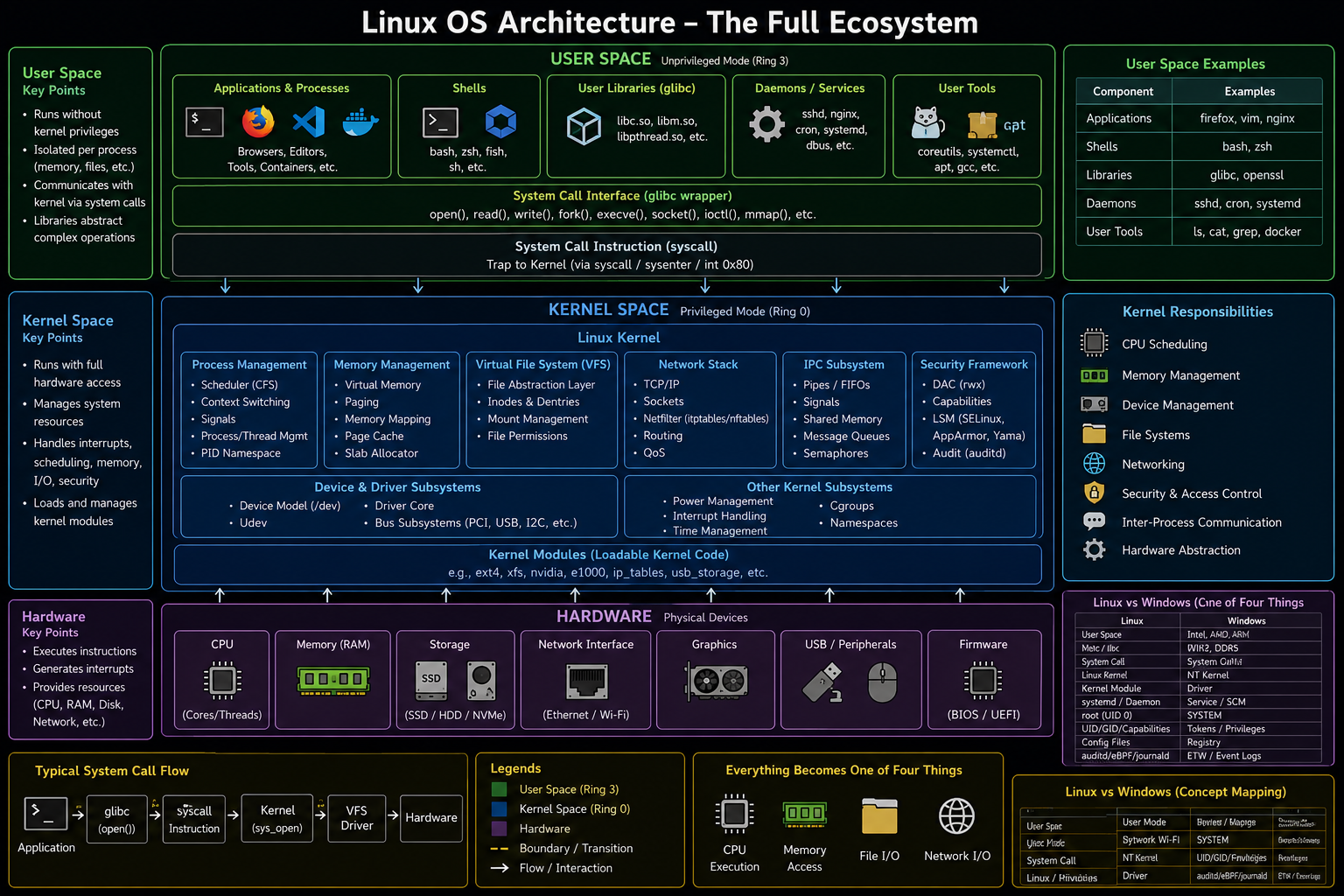
Linux OS Ecosystem
Application
    ↓
glibc / Libraries
    ↓
System Call
    ↓
Linux Kernel
    ↓
Kernel Subsystems
    ↓
Drivers
    ↓
Hardware
This is the Linux equivalent of:
Application
    ↓
Win32 API
    ↓
ntdll.dll
    ↓
System Call
    ↓
Kernel
User Space Components
| Component | Purpose | Examples |
|---|---|---|
| Applications | User programs | Firefox, Nginx, Vim |
| Processes | Running programs | nginx |
| Threads | Units of execution | Worker threads |
| Shared Libraries | Reusable code | libc.so |
| Shells | User interaction | Bash, Zsh |
| Daemons | Background services | sshd, cron |
| Package Managers | Software management | apt, yum |
User Space Library Layer
Most applications call:
glibc
before reaching the kernel.
Examples:
| Function | Syscall |
|---|---|
| open() | open/openat |
| read() | read |
| write() | write |
| fork() | clone |
| execve() | execve |
| socket() | socket |
Linux Process Model
Everything runs as a process.
PID 1 (systemd)
        ↓
Service
        ↓
Child Processes
Examples:
systemd
 ├─ sshd
 ├─ nginx
 ├─ cron
 └─ docker
Process Creation
fork()
      ↓
Child Process
      ↓
execve()
      ↓
New Program Image
Example:
bash
  ↓
fork()
  ↓
child
  ↓
execve("ls")
Linux Kernel Components
| Component | Responsibility |
|---|---|
| Scheduler | CPU allocation |
| Memory Manager | RAM management |
| VFS | Filesystem abstraction |
| Networking Stack | Network processing |
| IPC Subsystem | Process communication |
| Security Frameworks | Access control |
| Driver Framework | Hardware interaction |
Core Kernel Responsibilities
| Component | Purpose |
|---|---|
| Scheduler | Chooses next task |
| Interrupt Handling | Hardware events |
| System Call Handler | User→Kernel transition |
| Memory Manager | Virtual memory |
| VFS | Unified filesystem access |
| Network Stack | TCP/IP processing |
Linux Scheduler
Purpose:
CPU
 ↓
Scheduler
 ↓
Task Selection
Responsible for:
- Fair CPU allocation
- Process priorities
- Context switching
Memory Management
| Concept | Description |
|---|---|
| Virtual Memory | Process address space |
| Paging | Memory ↔ Disk |
| mmap() | File mapping |
| Heap | Dynamic allocation |
| Stack | Function calls |
| Page Cache | Cached files |
Linux Filesystem Architecture
Application
      ↓
VFS
      ↓
Filesystem Driver
      ↓
Block Layer
      ↓
Disk Driver
      ↓
Storage
Virtual Filesystem (VFS)
Purpose:
Application
      ↓
VFS
      ↓
ext4
xfs
btrfs
ntfs
Allows applications to use one interface regardless of filesystem.
Linux Security Model
User IDs
| ID | Purpose |
|---|---|
| UID | User identity |
| GID | Group identity |
| EUID | Effective privileges |
Example:
uid=1000
gid=1000
Root
UID 0
Equivalent to:
NT AUTHORITY\SYSTEM
in Windows.
Root bypasses most permission checks.
Linux Permission Model
Owner
Group
Others
Example:
-rwxr-x---
| Permission | Meaning |
|---|---|
| r | Read |
| w | Write |
| x | Execute |
Capabilities
Modern Linux splits root privileges.
Examples:
| Capability | Purpose |
|---|---|
| CAP_NET_ADMIN | Network administration |
| CAP_SYS_ADMIN | System administration |
| CAP_SYS_PTRACE | Debugging |
| CAP_DAC_OVERRIDE | Ignore file permissions |
Important for modern privesc.
Linux Namespaces
Used heavily by containers.
| Namespace | Isolation |
|---|---|
| PID | Processes |
| NET | Networking |
| MNT | Mounts |
| IPC | IPC |
| USER | Users |
| UTS | Hostname |
cgroups
Control resources.
Container
      ↓
cgroup
      ↓
CPU Limits
Memory Limits
I/O Limits
Foundation of Docker and Kubernetes.
Kernel Modules
Equivalent to Windows drivers.
Examples:
| Module | Purpose |
|---|---|
| e1000 | Network |
| nvidia | GPU |
| ext4 | Filesystem |
| usb_storage | USB |
Commands:
lsmod
modprobe
insmod
rmmod
Device Model
Everything is a file.
Examples:
| Device | File |
|---|---|
| Disk | /dev/sda |
| Terminal | /dev/tty |
| Random | /dev/random |
| Null | /dev/null |
Network Stack
Application
      ↓
Socket
      ↓
TCP/IP Stack
      ↓
NIC Driver
      ↓
NIC
      ↓
Network
IPC Mechanisms
| Mechanism | Purpose |
|---|---|
| Pipe | Parent-child communication |
| FIFO | Named pipe |
| Socket | Network/local communication |
| Shared Memory | Fast communication |
| Signal | Process notifications |
Service Architecture
Windows:
SCM
  ↓
Service
Linux:
systemd
   ↓
Service Unit
Examples:
systemctl status ssh
systemctl start nginx
Important Linux Directories
| Directory | Purpose |
|---|---|
| /bin | Essential binaries |
| /sbin | Administrative binaries |
| /etc | Configuration |
| /home | User data |
| /var | Logs and runtime |
| /tmp | Temporary files |
| /proc | Kernel process info |
| /sys | Device/kernel info |
| /dev | Devices |
Important DFIR Artifacts
| Area | Examples |
|---|---|
| Authentication | auth.log |
| Processes | ps history |
| Persistence | systemd units |
| Execution | bash_history |
| Networking | journalctl |
| Scheduled Tasks | cron |
| Services | systemctl |
| Logins | last, wtmp |
Important Offensive Targets
| Target | Why |
|---|---|
| sudo | Privilege escalation |
| SUID binaries | Privilege escalation |
| Capabilities | Privilege escalation |
| Cron Jobs | Persistence |
| systemd Units | Persistence |
| SSH Keys | Credential access |
| Docker | Container escape |
| Kernel Modules | Kernel access |
| NFS | Lateral movement |
| /proc | Reconnaissance |
Containers Architecture
Application
      ↓
Container
      ↓
Namespaces
      ↓
cgroups
      ↓
Kernel
      ↓
Hardware
Unlike VMs:
Container
      ↓
Shares Host Kernel
Linux Mental Model for Operators
User Space
      ↓
glibc
      ↓
System Calls
      ↓
Kernel
      ↓
Subsystems
      ↓
Drivers
      ↓
Hardware
Everything in Linux eventually becomes one of four things:
- CPU execution
- Memory access
- File I/O
- Network I/O
Every Linux attack, forensic artifact, kernel exploit, container breakout, persistence mechanism, and defensive control ultimately manipulates one or more of these four resources.